Choose the conversation
English to Modern Standard Arabic, Arabic to English, or bilingual mode when speakers switch languages.
EN → ARAR → ENEN ↔ AR
Live Arabic ↔ English captions over your presentation. Keep your slides on screen, and bring the conversation to everyone in the room.
Current release is in testing. The current release is not publicly available yet.
Made for the room.
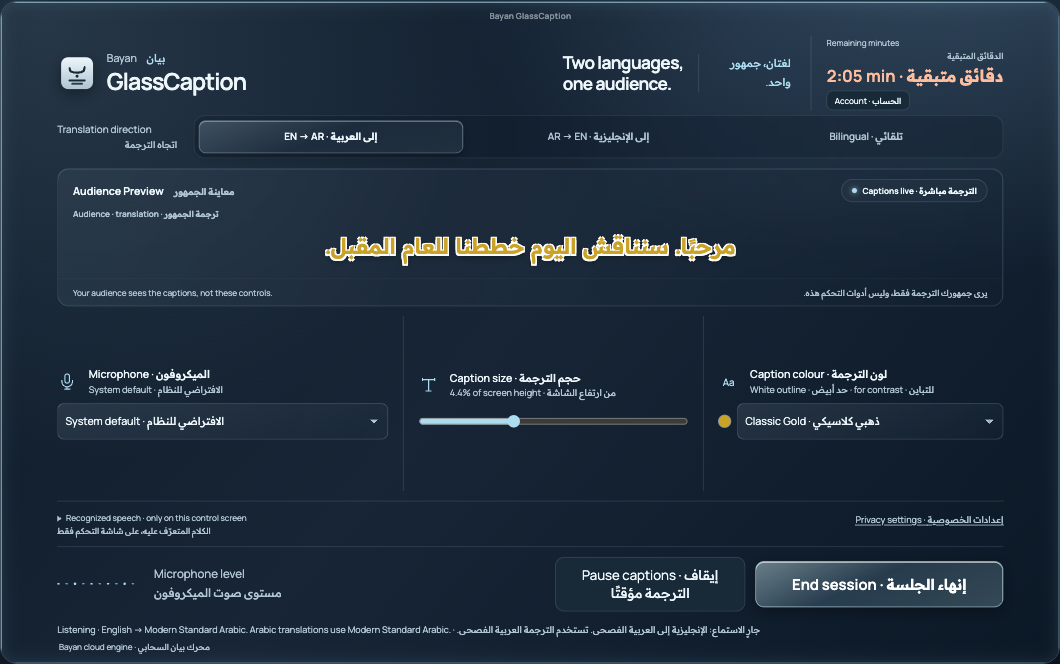
Choose a language direction on your Mac. Your audience reads the translated captions over the presentation.
Recorded real frontend with sample speech and balance. The audience presentation is an illustration; this is not live microphone recognition, translation, a native overlay recording or a speed benchmark.
Picture English and Arabic captions alongside a professional presentation, with your audience focused on the conversation.

Keep the important choices close, and the audience display clear.
English to Modern Standard Arabic, Arabic to English, or bilingual mode when speakers switch languages.
Adjust caption size and choose an outlined colour preset. Preview the audience captions from the presenter controls.
The desktop overlay is designed to sit above your presentation. The audience sees captions; microphone, language and account controls stay on the presenter screen.
Pause captions or end the session from one place. Live caption sessions require internet access.
Review cloud processing before starting captions. Speech recognition and translation use external cloud services. This is not an offline or entirely on-device tool.
Read about data useThe current Mac release is being tested. No public installer or purchase link is offered for the current release. Earlier prototype downloads are not the current release candidate.
No. Live captions require an internet connection for cloud speech recognition and translation.
English to Modern Standard Arabic, Arabic to English, and a bilingual mode for alternating speakers.
Prepaid minute packs are planned for the Mac App Store release. Public pricing and purchase availability are not finalized. Check release availability for updates.
The current verified desktop candidate is for Mac. Windows development and native testing remain in progress; no verified current Windows installer is offered here.
Review the release status before planning your next event around Bayan.